Roku Smart Home
Roku, Inc. & its affiliatesHouse & Home
4.48.42K Reviews
- Version
- 3.8.0.603
- Installs
- 1.00M
- Age Rating
- Everyone
Screenshots
Our Review of Roku Smart Home
 Analysis by Appyee
When I manage a smart home, the useful question is not how many controls an app can collect, but whether I can find the right one when I need it. Roku Smart Home is a House & Home app from Roku, Inc. and its affiliates, built around setting up and managing compatible home devices from a phone. I see its best role as a practical control point for people who want everyday tasks—checking a device, changing a setting, or keeping a routine consistent—in one place rather than spread across separate screens.
A sensible first routine, not a one-time setup
I would approach the app in stages: add the devices I actually use, give them clear names, and make sure the room or purpose is obvious before adding more complexity. That small bit of housekeeping matters later. “Hall light” is easier to act on than a vague device label when I am in a hurry, and grouping by room makes a busy home easier to scan. The app’s value grows when the layout reflects the way I move through the home, rather than simply mirroring the order in which devices were installed.
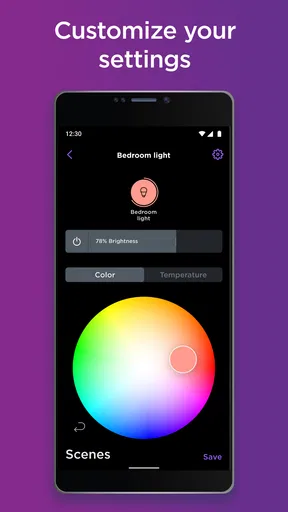
For a first-time user, I would start with one ordinary task, such as checking a connected device or changing a light setting, then repeat it until the route feels familiar. After that, I would consider whether a schedule or scene genuinely saves effort. This is a better way to judge the app than trying to configure everything at once: if the basic controls are easy to reach, there is a foundation for building a repeatable routine.
Getting Started with Ease
First things first, setting up the Roku Smart Home app was a breeze. I mean, who wants to spend hours fiddling with an app, right? All you need to do is download it from the App Store or Google Play, and you’re good to go. The interface is super intuitive, so even if you’re not tech-savvy, you’ll feel right at home. I was pleasantly surprised at how smoothly everything synced up. It’s like the app just knew what to do!
Settings worth checking before you rely on a routine
Once the initial setup is done, I would take a minute to check device names, room assignments, and any available settings for each device. A schedule is only helpful when it is attached to the right item and makes sense for the household’s normal rhythm. If people come and go at different times, a rigid schedule may be less useful than manual control; if evenings are predictable, a simple lighting routine can remove a small daily chore.
I also recommend testing any change while you are at home and able to see the result. That is especially sensible for a device that affects comfort or home awareness: confirm that the control you tapped corresponds to the device you intended, and check that a scheduled action behaves as expected before treating it as dependable. This is not glamorous, but it is how I avoid discovering a mistaken setting when I am away.
Features That Stand Out
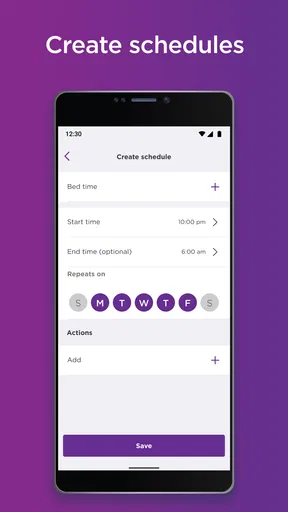
The app offers a bunch of features that make managing your smart devices a whole lot easier. One of my favorites is the ability to create custom scenes. Imagine coming home to a perfectly lit living room with your favorite playlist already playing. With a few taps, you can set that up. Another cool feature is the scheduling option. I set my lights to turn on automatically in the evening, which is a lifesaver when I forget to do it manually.
Scenes and schedules suit different needs. I think of a scene as a deliberate set of changes for a particular moment, while a schedule is for an action that should happen at a regular time. A useful scene might be a consistent evening arrangement for compatible devices; a schedule is better for a light that should come on at a usual hour. I would keep both modest at first. A few clear, named choices are easier to remember than a long collection of similar presets, and they are less likely to leave me wondering which one to use.
There is also a practical trade-off: routines reduce repeated tapping, but they can become inconvenient when the household’s day changes. If a schedule no longer fits, I would revise it rather than keep working around it manually. For a temporary exception, using the direct control may be simpler than building a special routine that will rarely be needed again.
Faster patterns for ordinary days
A realistic use case is leaving home in a rush. Instead of opening several device screens and making changes one by one, I can use a familiar arrangement of rooms and device names to get to the controls I need quickly. If I have made a scene for a repeatable situation, it can reduce that sequence further. The important habit is to keep the scene focused on actions I actually want together, rather than assuming every device should be included just because it is available.
For a household with more than one person, clear labels are even more valuable. A name that makes sense only to the person who installed the device can slow everyone else down. I would choose plain descriptions and avoid near-duplicates, then show other household members the most common control path. This small bit of organization can make a shared setup feel much less like a personal project that only one person knows how to operate.
Another useful habit is to make changes in a predictable order: check the room, select the intended device, adjust it, and then confirm the result. That might sound obvious, but it is a good safeguard when several similar devices appear together. It is also why I would not overfill the app with devices or routines I rarely use. A neat control screen is often faster than an ambitious one.
Voice control and the limits of convenience
Oh, and let’s not forget about the voice control integration. If you have a compatible device, you can just say the word, and things happen like magic. It’s like living in the future!
I see voice control as a useful extra, not a replacement for knowing how to operate the app. It can be handy when my hands are occupied or I am already in the room, but it depends on having a compatible device and on the spoken request being understood. When a command does not work as expected, the app gives me a more direct way to check the device and make the adjustment myself. For a home where voice commands are not comfortable or practical, touch controls and simple schedules are perfectly reasonable ways to use the app.
Managing Your Devices
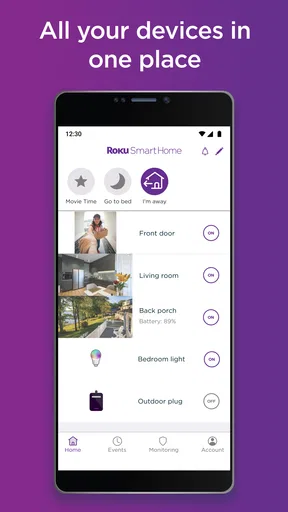
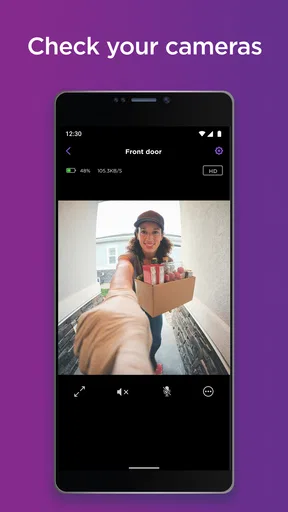
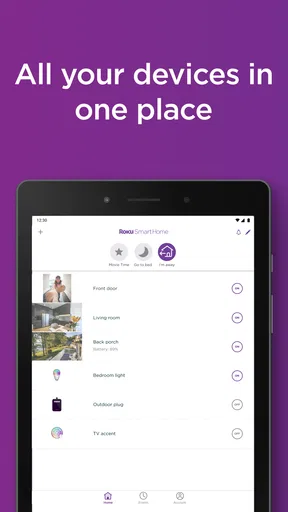
One thing I really appreciated was how the app handles multiple devices. It’s organized in a way that makes it easy to get an overview of everything you’ve got going on. You can group devices by room or function, which is super handy. I loved being able to adjust my thermostat and check my security cameras all from the same app. It’s like having a remote control for your entire house.
That overview is most helpful when the devices are compatible with the Roku Smart Home app and the home is not so complicated that the screen becomes a jumble. It should not be mistaken for a universal controller for every smart-home product. Before choosing it as the centre of a new setup, I would check that the devices I already own—or plan to buy—work with it. If the home relies on products from several ecosystems, their own apps may still be needed for setup, specialized controls, or features that are not available in this one.
There is also a difference between having several devices visible and having a genuinely useful overview. Room names, consistent labels, and a few routines make the list more actionable. If I only need to control one or two devices, this organizational benefit may feel modest. With multiple compatible devices used in different rooms, it becomes much more worthwhile because I spend less time remembering which separate app or screen holds each control.
Where it fits among other smart-home apps
Compared with using a separate manufacturer app for every device, Roku Smart Home’s appeal is the chance to bring compatible controls together and organize them around rooms or functions. That can make routine use less fragmented. The trade-off is that a dedicated device app may offer more detailed controls for its own product, while a broader smart-home platform may suit someone whose home already spans many brands. I would choose based on the equipment I own and the controls I use most, not on the assumption that one app will replace every other one.
It is a good fit for someone building a manageable collection of compatible devices who wants a straightforward place to handle common tasks. It is less compelling for someone who expects every connected product in the home to appear automatically, needs specialist controls for a particular device, or prefers to keep all automation inside another established ecosystem. Those users may be happier treating Roku Smart Home as a companion for compatible products rather than as the single command centre for the entire house.
The app is free to download, has an Everyone age rating, and is rated 4.4 on average from around 51,000 ratings, with over a million installs. It includes in-app purchases priced from $3.99 to $119.99 per item, so I would check the details of any purchase before committing rather than assuming every part of the smart-home experience is included at no cost. Its current version is 3.4.0.551, and it requires Android 9 or later. These details make it easy to judge whether it fits your phone and expectations before setting up a home around it.
Advanced limits to keep in mind
The biggest limitation I would plan around is compatibility. An app can only simplify the devices it can work with, so it is worth checking that point before buying hardware for the sake of having one control screen. A second limitation is that routines depend on the setup staying understandable. If device names, room groupings, or schedules become confusing, the convenience fades and direct control can be slower than expected.
I would also avoid treating scheduled actions as a substitute for checking a device when the result matters. A routine is useful for predictable everyday behaviour, but a person may change plans, and a home may not follow its usual pattern. Keeping an easy manual route alongside any automation gives me a fallback. That balance—automate the repetitive, keep important controls easy to reach—is a more reliable way to use a smart-home app than trying to automate every possible situation.
For someone deciding whether to install it, the key questions are practical: do you have compatible devices, do you want to control them from one place, and will room grouping or repeatable routines save time in your home? If the answer to those questions is yes, the app has a clear purpose. If you need broad support across unrelated product families or advanced controls specific to another system, I would look at that system’s own app first and use Roku Smart Home only where it fits.
Final Thoughts
All in all, the Roku Smart Home app has definitely elevated my smart home experience. It’s user-friendly, packed with useful features, and makes managing your smart devices a breeze. Whether you’re a tech enthusiast or just starting out, this app is a must-have. Give it a try, and you might just find yourself wondering how you ever lived without it!
My more measured recommendation is to start with a small, useful setup and let the app earn a bigger role through everyday use. Keep labels clear, test schedules, and make scenes only for combinations you repeat. That approach makes the app easier to live with and also reveals its limits early: if your devices do not fit its compatibility range, or you need a different platform’s deeper controls, another option may suit you better. For a home built around compatible Roku Smart Home devices, though, it can be a convenient way to make ordinary adjustments feel less scattered.
Privacy and Permissions
See what permissions an app requests and how it handles your data.
- Location
- approximate location (network-based), precise location (GPS and network-based)
- Phone
- read phone status and identity
- Photos/Media/Files
- read the contents of your USB storage, modify or delete the contents of your USB storage
- Storage
- read the contents of your USB storage, modify or delete the contents of your USB storage
- Camera
- take pictures and videos
- Microphone
- record audio
- Wi-Fi connection information
- view Wi-Fi connections
- Device ID & call information
- read phone status and identity
- Other
- view network connections, pair with Bluetooth devices, access Bluetooth settings, change network connectivity, allow Wi-Fi Multicast reception, connect and disconnect from Wi-Fi, disable your screen lock, control flashlight, full network access, change your audio settings, run at startup, reorder running apps, draw over other apps, use accounts on the device, control vibration, prevent device from sleeping, Google Play license check
Verdict
Strengths of Roku Smart Home
- Easy setup and user-friendly interface.
- Seamless integration with Roku devices.
- Affordable price for quality features.
- Offers robust security options.
- Wide compatibility with smart home devices.
Limitations of Roku Smart Home
- Limited third-party device support.
- Requires stable internet connection.
- Occasional app connectivity issues.
- Basic features in free version only.
- Lacks advanced automation options.
Other Releases by Roku, Inc. & its affiliates
View All
The Roku App (Official)
Entertainment4.7

The Roku Channel
Entertainment4.1
Similar Picks in This Category
View All
Universal TV Remote Control
CodeMatics Media Solutions3.9

AlfredCamera Home Security app
Alfred Systems Inc.4.7

Planner 5D: AI Home Design
Planner 5D4.5

Universal Tv Remote-Cast to TV
One Music Player4.1

Zillow: Homes for Sale & Rent
Zillow Group4.8

99acres Buy/Rent/Sell Property
infoedge.com4.3
Frequently Asked Questions
What is the Roku Smart Home app used for?
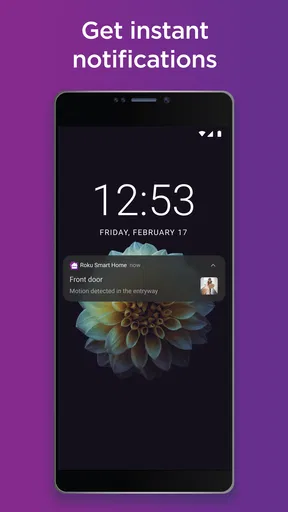
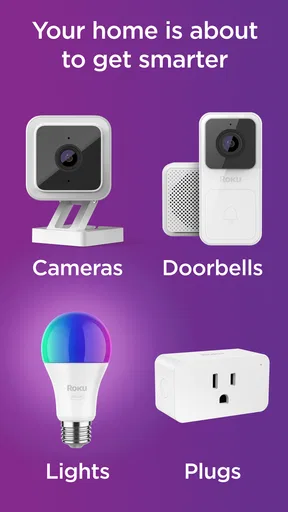
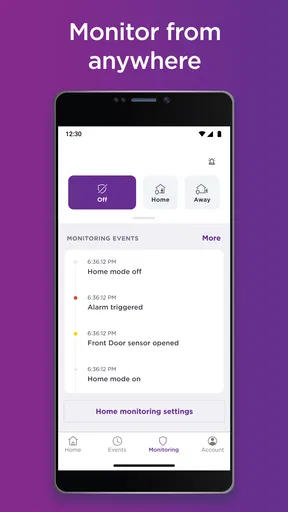
The Roku Smart Home app is designed to seamlessly integrate and control various smart home devices, such as lights, cameras, and plugs, all from a single platform. It allows users to manage their home environment remotely, ensuring convenience and enhancing security by providing real-time updates and control.
Is the Roku Smart Home app compatible with all smart devices?
The Roku Smart Home app is compatible with a wide range of devices, but it's essential to check the compatibility list on the app's official website or within the app store. Generally, it supports popular smart home brands and devices, but some older or niche devices may not be supported.
How secure is the Roku Smart Home app?
Security is a top priority for the Roku Smart Home app. It utilizes encryption and secure protocols to protect user data and privacy. Additionally, users are encouraged to employ strong, unique passwords and enable two-factor authentication to enhance their account security further.
Can I control my devices with voice commands using the Roku Smart Home app?
Yes, the Roku Smart Home app supports voice control through integration with virtual assistants like Amazon Alexa and Google Assistant. This feature allows users to perform tasks such as adjusting lighting or setting up routines with simple voice commands, adding to the app's convenience.
Does the Roku Smart Home app require a monthly subscription?
The Roku Smart Home app itself does not require a monthly subscription for basic functionality. However, some advanced features or integrations might necessitate a subscription or additional purchase. It's advisable to review the app's pricing details for any potential costs associated with premium services.
